Puku CLI
A coding agent that lives in the terminal.

- Role
- Product & design lead
- Scope
- 142 screens · 18 flows · dark & light
- Platform
- Terminal · 1032-wide window
The brief
Bring the full agent workflow — onboarding, agent turns, sub-agents, permissions, diffs, extensions and errors — into a keyboard-only surface where every state must read in monospace.
What I did
- Built a numbered inventory of every terminal state (01–96, then lettered sections) before drawing, using a reference CLI as a coverage checklist.
- Designed trust, device-code sign-in, onboarding and the welcome screen, then the in-session tools: slash menu, @-file mention, shift+tab mode toggle, model and effort pickers.
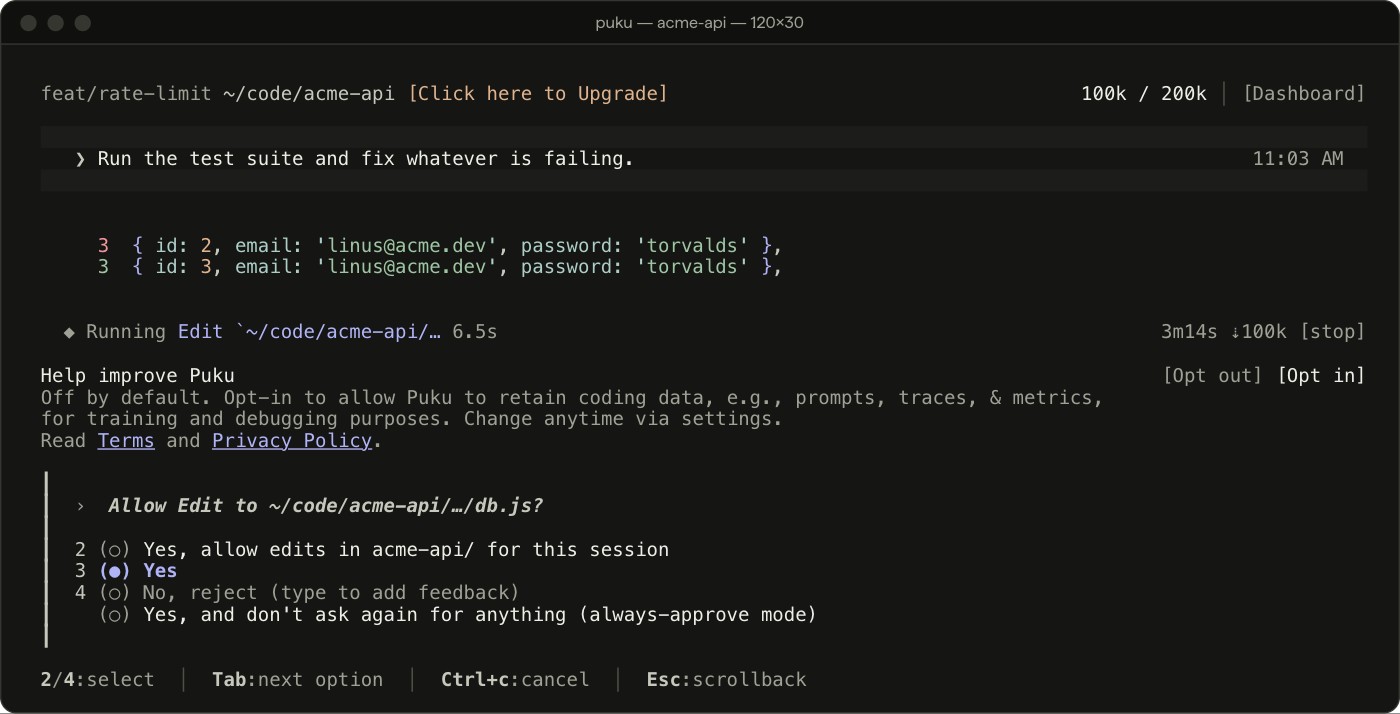
- Specified permission prompts for running commands and editing with an inline diff, plus auto-compact, /rewind and a /sessions agent dashboard.
- Covered the hard edges: usage limits and upgrade, offline, MCP servers, hooks, memory and quit.
Key decisions
- D.1
Privacy as opt-in
The data-sharing banner ships off by default, with an explicit [Opt in].
- D.2
Context you can see
A 100k / 200k meter makes compaction predictable instead of surprising.
- D.3
Separate token set
--cli-* and --cli-light-* tokens keep terminal colour independent from the GUI apps.
Next Puku product
Puku Agent
